Format
DATEV format EXTF, booking batch (data category 21, format version 13), Windows-1252 character set. One batch per month, booked by payment date.
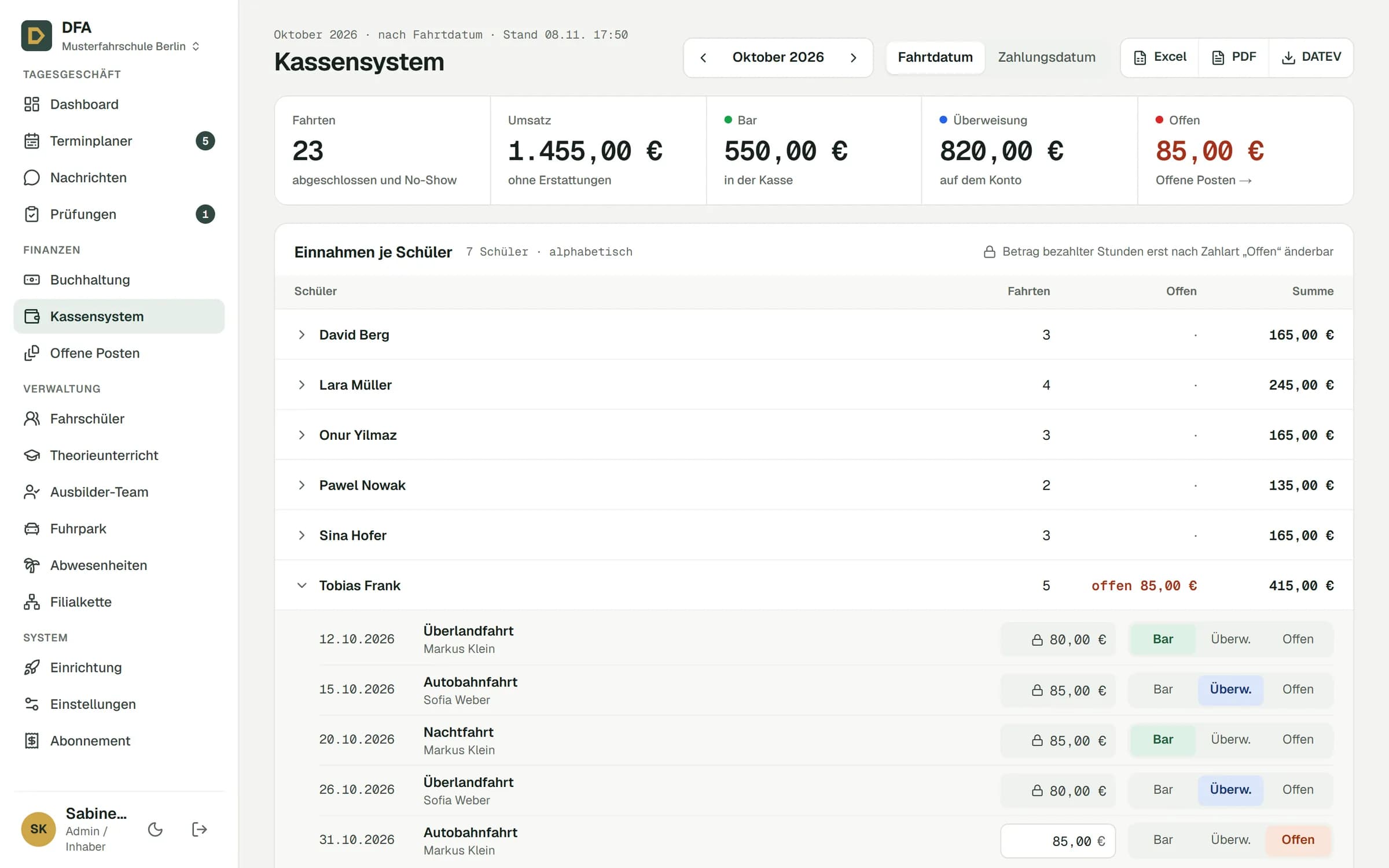
For every lesson you mark whether it was paid in cash or by transfer. At month end you download the cash book as Excel and PDF, plus the booking batch your tax advisor imports into DATEV.
Three files from the same numbers. Whatever is in the cash register is in the export.
An excerpt for October, exactly as it comes out of DFA. The file is in German, as DATEV expects. Account is cash or bank, contra account the revenue account.
"EXTF";700;21;"Buchungsstapel";13;20261102091403512;;"RE";"DFA";"";29098;55003;20260101;4;20261001;20261031;"Kassenbuch 10/2026";"";1;0;0;"EUR";;"";;;"03";;;"";""
Umsatz (ohne Soll/Haben-Kz);Soll/Haben-Kennzeichen;WKZ Umsatz;Kurs;Basis-Umsatz;WKZ Basis-Umsatz;Konto;Gegenkonto (ohne BU-Schlüssel);BU-Schlüssel;Belegdatum;Belegfeld 1;Belegfeld 2;Skonto;Buchungstext;Postensperre;Diverse Adressnummer;Geschäftspartnerbank;Sachverhalt;Zinssperre;Beleglink;Beleginfo - Art 1;Beleginfo - Inhalt 1;Beleginfo - Art 2;Beleginfo - Inhalt 2;Beleginfo - Art 3;Beleginfo - Inhalt 3;Beleginfo - Art 4;Beleginfo - Inhalt 4;Beleginfo - Art 5;Beleginfo - Inhalt 5;Beleginfo - Art 6;Beleginfo - Inhalt 6;Beleginfo - Art 7;Beleginfo - Inhalt 7;Beleginfo - Art 8;Beleginfo - Inhalt 8;KOST1 - Kostenstelle;KOST2 - Kostenstelle;Kost-Menge;EU-Land u. UStID (Bestimmung);EU-Steuersatz (Bestimmung);Abw. Versteuerungsart;Sachverhalt L+L;Funktionsergänzung L+L;BU 49 Hauptfunktionstyp;BU 49 Hauptfunktionsnummer;BU 49 Funktionsergänzung;Zusatzinformation - Art 1;Zusatzinformation- Inhalt 1;Zusatzinformation - Art 2;Zusatzinformation- Inhalt 2;Zusatzinformation - Art 3;Zusatzinformation- Inhalt 3;Zusatzinformation - Art 4;Zusatzinformation- Inhalt 4;Zusatzinformation - Art 5;Zusatzinformation- Inhalt 5;Zusatzinformation - Art 6;Zusatzinformation- Inhalt 6;Zusatzinformation - Art 7;Zusatzinformation- Inhalt 7;Zusatzinformation - Art 8;Zusatzinformation- Inhalt 8;Zusatzinformation - Art 9;Zusatzinformation- Inhalt 9;Zusatzinformation - Art 10;Zusatzinformation- Inhalt 10;Zusatzinformation - Art 11;Zusatzinformation- Inhalt 11;Zusatzinformation - Art 12;Zusatzinformation- Inhalt 12;Zusatzinformation - Art 13;Zusatzinformation- Inhalt 13;Zusatzinformation - Art 14;Zusatzinformation- Inhalt 14;Zusatzinformation - Art 15;Zusatzinformation- Inhalt 15;Zusatzinformation - Art 16;Zusatzinformation- Inhalt 16;Zusatzinformation - Art 17;Zusatzinformation- Inhalt 17;Zusatzinformation - Art 18;Zusatzinformation- Inhalt 18;Zusatzinformation - Art 19;Zusatzinformation- Inhalt 19;Zusatzinformation - Art 20;Zusatzinformation- Inhalt 20;Stück;Gewicht;Zahlweise;Forderungsart;Veranlagungsjahr;Zugeordnete Fälligkeit;Skontotyp;Auftragsnummer;Buchungstyp;USt-Schlüssel (Anzahlungen);EU-Land (Anzahlungen);Sachverhalt L+L (Anzahlungen);EU-Steuersatz (Anzahlungen);Erlöskonto (Anzahlungen);Herkunft-Kz;Buchungs GUID;KOST-Datum;SEPA-Mandatsreferenz;Skontosperre;Gesellschaftername;Beteiligtennummer;Identifikationsnummer;Zeichnernummer;Postensperre bis;Bezeichnung SoBil-Sachverhalt;Kennzeichen SoBil-Buchung;Festschreibung;Leistungsdatum;Datum Zuord. Steuerperiode;Fälligkeit;Generalumkehr (GU);Steuersatz;Land;Abrechnungsreferenz;BVV-Position;EU-Land u. UStID (Ursprung);EU-Steuersatz (Ursprung);Abw. Skontokonto
65,00;"S";"EUR";;;"";1000;8400;"";0610;"RE-2026-0187";"";;"Lara Müller, Übungsstunde";;"";;;;"";"";"";"";"";"";"";"";"";"";"";"";"";"";"";"";"";"";"";;"";;"";;;;;;"";"";"";"";"";"";"";"";"";"";"";"";"";"";"";"";"";"";"";"";"";"";"";"";"";"";"";"";"";"";"";"";"";"";"";"";"";"";"";"";;;;"";;;;"";"";;"";;;;"";"";;"";;"";;"";"";;"";;;;;;"";;"";"";;"";;
85,00;"S";"EUR";;;"";1200;8400;"";1410;"RE-2026-0193";"";;"Tobias Frank, Überlandfahrt";;"";;;;"";"";"";"";"";"";"";"";"";"";"";"";"";"";"";"";"";"";"";;"";;"";;;;;;"";"";"";"";"";"";"";"";"";"";"";"";"";"";"";"";"";"";"";"";"";"";"";"";"";"";"";"";"";"";"";"";"";"";"";"";"";"";"";"";;;;"";;;;"";"";;"";;;;"";"";;"";;"";;"";"";;"";;;;;;"";;"";"";;"";;
65,00;"S";"EUR";;;"";1000;8400;"";1710;"RE-2026-0198";"";;"Onur Yilmaz, Übungsstunde (Ausfallgebühr)";;"";;;;"";"";"";"";"";"";"";"";"";"";"";"";"";"";"";"";"";"";"";;"";;"";;;;;;"";"";"";"";"";"";"";"";"";"";"";"";"";"";"";"";"";"";"";"";"";"";"";"";"";"";"";"";"";"";"";"";"";"";"";"";"";"";"";"";;;;"";;;;"";"";;"";;;;"";"";;"";;"";;"";"";;"";;;;;;"";;"";"";;"";;
80,00;"S";"EUR";;;"";1000;8400;"";2010;"RE-2026-0204";"";;"Tobias Frank, Nachtfahrt";;"";;;;"";"";"";"";"";"";"";"";"";"";"";"";"";"";"";"";"";"";"";;"";;"";;;;;;"";"";"";"";"";"";"";"";"";"";"";"";"";"";"";"";"";"";"";"";"";"";"";"";"";"";"";"";"";"";"";"";"";"";"";"";"";"";"";"";;;;"";;;;"";"";;"";;;;"";"";;"";;"";;"";"";;"";;;;;;"";;"";"";;"";;
65,00;"H";"EUR";;;"";1200;8400;"";2310;"RE-2026-0171";"";;"Erstattung David Berg, Übungsstunde";;"";;;;"";"";"";"";"";"";"";"";"";"";"";"";"";"";"";"";"";"";"";;"";;"";;;;;;"";"";"";"";"";"";"";"";"";"";"";"";"";"";"";"";"";"";"";"";"";"";"";"";"";"";"";"";"";"";"";"";"";"";"";"";"";"";"";"";;;;"";;;;"";"";;"";;;;"";"";;"";;"";;"";"";;"";;;;;;"";;"";"";;"";;Preset to SKR03, you can switch to SKR04 in the settings. Whether 8400 or 8195 appears in the batch depends on your school's VAT setting in DFA.
The batch books cash movements. Anything still open stays out until it is paid.
After the lesson you mark it as paid in cash or by transfer. DFA assigns the invoice number itself.
The cash register shows the month with revenue, cash, transfer and open, per student down to each lesson.
Excel, PDF or DATEV at the top right. Pick the month and the file is there.
Send the batch to your tax advisor. They import it instead of booking every lesson by hand.
The technical details in brief.
DATEV format EXTF, booking batch (data category 21, format version 13), Windows-1252 character set. One batch per month, booked by payment date.
Amount with debit/credit flag, account cash or bank, contra account revenue, document date is the payment day. Document field 1 holds the invoice number, the booking text the student and the service.
You enter the adviser and client numbers once in the settings, they then appear in the file header. Refunds come as a reverse booking with H in the month of the refund.
Yes, the file is a booking batch in DATEV's EXTF format. They import it into DATEV. The adviser and client numbers are already included if you have entered them in the settings.
Yes. In the settings you switch the chart of accounts to SKR04. The export then books to cash 1600, bank 1800 and revenue 4400, or 4185 as a small business.
They are in the batch for the month the money came in. Excel and PDF can also be created by lesson date, so you see the month as it was driven.
Yes. Pick any month in the cash register and download the files again.
Yes, already in the Starter plan at €59 per month plus VAT.
Enter a few lessons, mark them as paid and download the batch. No credit card, cancel monthly.